homelab.ricebucket.dev #
There was a Porkbun promotion around February 2024 that allowed me to acquire ricebucket.dev for free for a year. Might as well put that to good use.
Do I want to continue paying for this domain after the first year? I got so many domains…
Design implementations #
This is the first service of my homelab, thus, everything will be created from scratch.
sitebook-homelab-public organization #
One repository will be used to store all my homelab configurations.
konri@macmini-m2 ~
% gh repo create sitebook-homelab-public --public --add-readme --description 'My HomeLab SiteBook'
✓ Created repository initialgyw/sitebook-homelab-public on GitHub
konri@macmini-m2 sitebook-homelab % ls -al
drwxr-xr-x@  3 konri  konri   96 May 16 22:18 .github
-rw-r--r--@  1 konri  konri   18 May 14 21:43 README.md
drwxr-xr-x@  5 konri  konri  160 May 16 22:28 terraform
The terraform directory contain subdirectories in reference to each of the Terraform Cloud workspaces. Each of the Terraform Cloud Workspaces will either be a service (DNS or this website) or a provider (all the free resources in Oracle Cloud).
Each Terraform Workspace will have an associate GitHub Action under .github/workflows. For example
konri@macmini-m2 sitebook-homelab % tree -a
.
├── .github
│   └── workflows
│       └── terraform-example1.yml
└── terraform
    └── example1
        ├── data.tf
        ├── main.tf
        ├── providers.tf
        └── tf_cloud.tf
GitHub Actions will only be watching Pull Requests and Merges for its respective workspaces.
konri@macmini-m2 sitebook-homelab % cat .github/workflows/example1.yml
name: Configuring <NAME>

on:
  push:
    branches:
    - main
    paths:
    - 'terraform/example1/**'
  pull_request:
    types:
      - reopened
      - opened
      - synchronize
      - edited
    branches:
    - main
    paths:
    - 'terraform/example1/**'
Prerequisites #
Signup for Terraform Cloud #
-
Create organization
-
Enable 2FA under User Settings/Profile -> Two Factor Authentication
-
Create a API token to use in GitHub Actions
There are few ways to create an API token
-
Using the web GUI User Settings/Profile -> Tokens
-
Log in via
terraform login. Token will be inkonri@macmini-m2 ~ % cat ~/.terraform.d/credentials.tfrc.json { "credentials": { "app.terraform.io": { "token": "<REDACTED>" } } } -
I would need the first token to create a token via POST. So, this would not work.
-
Signup for Cloudflare #
- My Profile -> Authentication -> Two Factor Authentication
Procedure #
- Point
ricebucket.devname servers to Cloudflare
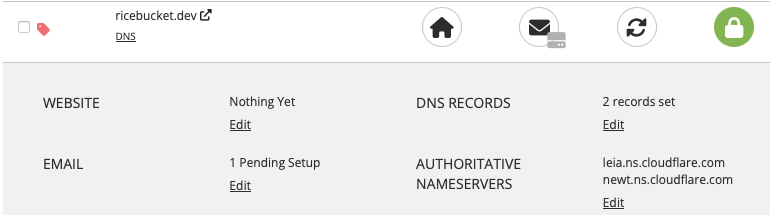
Note: I got these two nameservers when I manually added to Cloudflare for testing.
Reference: https://developers.cloudflare.com/dns/zone-setups/full-setup/setup
-
Set Terraform to manage
ricebucket.devin Cloudflare-
Create Cloudflare API Token
My Profile -> API Tokens -> Create Token
I called it Terraform for I know the token will be used in Terraform Cloud. It will have permissions of the following with NO TTL (Should probably not do that but there is no automation to manage these API tokens).
Account – Cloudflare Pages – Edit Zone – Zone – Edit Zone – DNS – Edit
-
Note down the account ID
https://developers.cloudflare.com/fundamentals/get-started/basic-tasks/find-account-and-zone-ids
I actually don’t know how to get it without adding a Zone in first.
-
Create dns workspace to manage all the DNS records
konri@macmini-m2 sitebook-homelab % ls -l terraform/dns
total 24
lrwxr-xr-x@ 1 konri  konri   20 May 16 22:26 config-dns.yml -> ../../config-dns.yml
-rw-r--r--@ 1 konri  konri  383 May 16 22:26 main.tf
-rw-r--r--@ 1 konri  konri  192 May 16 22:26 providers.tf
-rw-r--r--@ 1 konri  konri  103 May 16 22:26 tf_cloud.tf
Perform a Terraform Plan will generate the workspace in Terraform Cloud.
https://github.com/initialgyw/sitebook-homelab-public/pull/1/files
I’ve decided to create config files in the root directory to be accessed by other applications. BUT Terraform Cloud can’t read any files from outside of the workspace.
konri@macmini-m2 ~/sitebook-homelab-public/terraform/workspace-example
% cat main.tf
locals {
   cloudflare_zones = toset(keys(yamldecode(file("../../config-dns.yml"))["cloudflare"]["zones"]))
}
This would error out:
Error: Error in function call

  on main.tf line 2, in output "dns":
   2:   value = yamldecode(file("../../config-dns.yml"))["cloudflare"]["zones"]
    ├────────────────
    │ while calling yamldecode(src)

Call to function "yamldecode" failed: on line 7, column 1: could not find
expected ':'.
Error: Terraform exited with code 1.
Error: Process completed with exit code 1.
To fix this, I symlink it to the workspace. Any new workspace that requires config files will need to have the config file symlinked to that workspace.
-
Create Cloudflare Variable Set and Apply to dns workspace
I foresee using Cloudflare provider a lot so it’s better to create a variable set and just apply it when new workspaces are created.
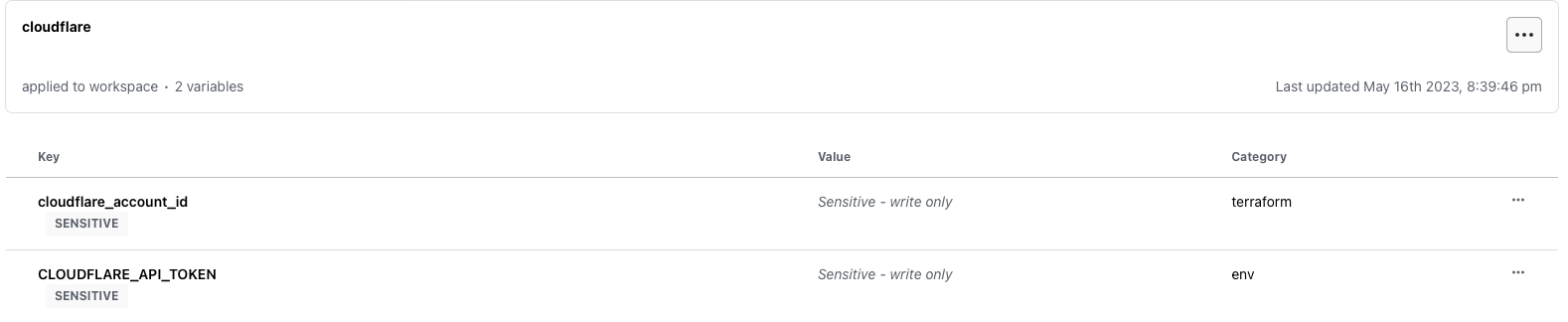
Apply it to dns workspace: dns –> Variables –> Apply variable set –> cloudflare
-
Create a Terraform Cloud API Token for Github
User Settings -> Tokens -> Create an API Token. I called it Github and set the Expiration to No Expiration. Note to self to fix. This allows Github Actions to plan and apply state. Add this token to Github
sitebook-homelab-publicrepository:konri@macmini-m2 sitebook-homelab % gh secret set -R initialgyw/sitebook-homelab-public -a actions TF_API_TOKEN ? Paste your secret ****************************************************************************************** ✓ Set Actions secret TF_API_TOKEN for initialgyw/sitebook-homelab-public -
Create a GitHub token for GitHub Actions
GitHub Actions needs a token to pull down repositories and comment on PR.
Settings -> Developer Settings -> Personal Access Tokens -> Fine-grained tokens -> Generate new token
- Repository Access -> Only Selected repositories
- initialgyw/sitebook-homelab-public
- Repository Permissions
- Contents -> Read and Write
- Pull Requests -> Read and Write
Add this token to Github
sitebook-homelab-publicrepository:konri@macmini-m2 sitebook-homelab % gh secret set -R initialgyw/sitebook-homelab-public -a actions GH_TOKEN ? Paste your secret ********************************************************************************************* ✓ Set Actions secret GH_TOKEN for initialgyw/sitebook-homelab-public - Repository Access -> Only Selected repositories
-
Create a PR in
initialgyw/sitebook-homelab-publicto merge changes tomainhttps://github.com/initialgyw/sitebook-homelab-public/pull/1
Once the PR is merged, Cloudflare will manage
ricebucket.dev.
-
-
Set Terraform to manage
homelab.ricebucket.dev-
Set dns workspace to share output
Workspace Settings -> General -> Remote State Sharing -> Share with all workspaces in this organization
This is needed to get the Cloudflare
ricebucket.devZone ID -
Create another GitHub Token to be used in Terraform
Github Provider in Terraform needs the ability to create repositories.
Settings -> Developer Settings -> Personal Access Tokens -> Fine-grained tokens -> Generate new token. Call it
terraform-cloud.- Repository Access -> All Repository Access
- Repository Permissions
- Administration -> Read and Write
-
Create a github variable set in Terraform Cloud
It should contain Sensitive Environment Variable called
GITHUB_TOKEN. -
Create the
terraform/site-homelabsubdirectory ininitialgyw/sitebook-homelab-publicrepo and runterraform plan.This will create the
site-homelabworkspace.The code will do the following:
- create
site-homelabGithub Repository - Create a Cloudflare page that links the deployment to
initialgyw/site-homelabrepository - create a
homelab.ricebucket.devDNS record
  Note: Manual Steps

  * I am unable to automatically create the first deployment.
    As of cloudflare 4.6.0, I don't see anyway to create the Cloudflare Page deployment.

  * I am unable to enable web analytics.
    Terraform state shows I need `web_analytics_tag` and `web_analytics_token`
    but I can't figure out how to generate this via cloudflare terraform provider in version 4.6.0.

    "build_config": [
    {
      ...
      "web_analytics_tag": "",
      "web_analytics_token": ""
    }
The first deployment should fail as the GitHub Repository is empty.
- create
-
-
Clone
site-homelaband configure the sitekonri@macmini-m2 initialgyw % brew install hugo konri@macmini-m2 initialgyw % gh repo clone initialgyw/site-homelab sitebook-homelab Cloning into 'site-homelab'... ... konri@macmini-m2 initialgyw % cd sitebook-homelab konri@macmini-m2 sitebook-homelab % hugo new site . --force Congratulations! Your new Hugo site is created in /Users/konri/github/initialgyw/site-homelab. konri@macmini-m2 site-homelab % git submodule add https://github.com/alex-shpak/hugo-book themes/hugo-book konri@macmini-m2 site-homelab % cp themes/hugo-book/exampleSite/config.toml . konri@macmini-m2 site-homelab % git add * konri@macmini-m2 site-homelab % git commit -m 'initializing' konri@macmini-m2 site-homelab % git branch -M main konri@macmini-m2 site-homelab % git push origin mainhttps://github.com/initialgyw/site-homelab/pull/1/files
Pushing this to
mainbranch will trigger Cloudflare pages start deploying. This site is now LIVE!