Terraform
April 30, 2023
Modern Systems Administrators are all about Infrastructure as Code these days. To be able to create an immutable resource and it’s dependencies by writing few lines of code has a huge impact in the way I manage my infrastructure. One of the best tools that allows me to do this is Terraform, an open source Hashicorp product.
How do I make Terraform more devopsy, if that is a word. How can I automate the state of my services? Terraform by itself is just a tool to run on command line against bunch of Hashicorp Configuration Language files. How do I automatically run Terraform whenever the TF files are changed? Use cron to constantly check for changes? That’s a horrible idea!
GitHub with GitHub Actions #
One good idea that comes to mind is to use Github Actions. I am already using GitHub as my code repository. And with GitHub Actions, I can apply specific actions when new files are updated.
In this case, I would store my Terraform code in a repository, and when changes are pushed to a branch and pull request is submitted to merge the changes into the main branch, GitHub would automatically plan the Terraform code. When the commit is merged into the main branch, Terraform would automatically apply the changes.
And this is all serverless and FREE, but there is a problem. In order for Terraform to manage resources, it needs a state file. That must be a persistent storage that lives in a secure location. Can I store this state in the same git private repository and whenever Terraform has apply the plan, then commit the updated state file back into the repository? That sounds kind of messy.
Terraform Cloud #
Another solution that I came across is by Hashicorp themselves: Terraform Cloud. Hashicorp built a fancy looking UI that can run Terraform code with a forever free plan. The free version can do everything except for user management. My homelab is just for me, myself, and I so it’s not really problem for me.
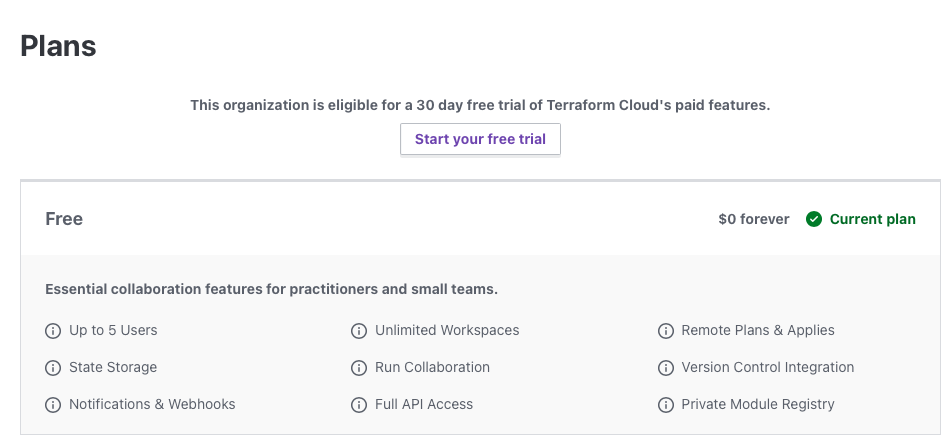
One bad thing about this is that, it doesn’t store my Terraform code. My Terraform files need to be stored elsewhere like in a git repository. Terraform Cloud Workspaces install a webhook in the git repository to detect pull requests and merges to plan and apply the changes. It does provide a storage for state files (Unlimited? I don’t know. It does not say on the Free Tier page). I am also behold to Hashicorps’ security as I need to trust them to secure my state file. (I’m pretty sure their security is better than what I can do.)
If I don’t trust Hashicorp’s security, I can always use another remote storage, like a cloud provider’s storage solution: AWS S3, Azure Storage, or Oracle Bucket. But then I need to manage three services to create my resources: code repository, Terraform service, and storage.
Since I am already using GitHub, I think incorporating Terraform Cloud with GitHub Actions might be the way to go.
Terraform Cloud with GitHub Actions #
Looking at Hashicorp’s Terraform documentation, this is exactly what I want to do.
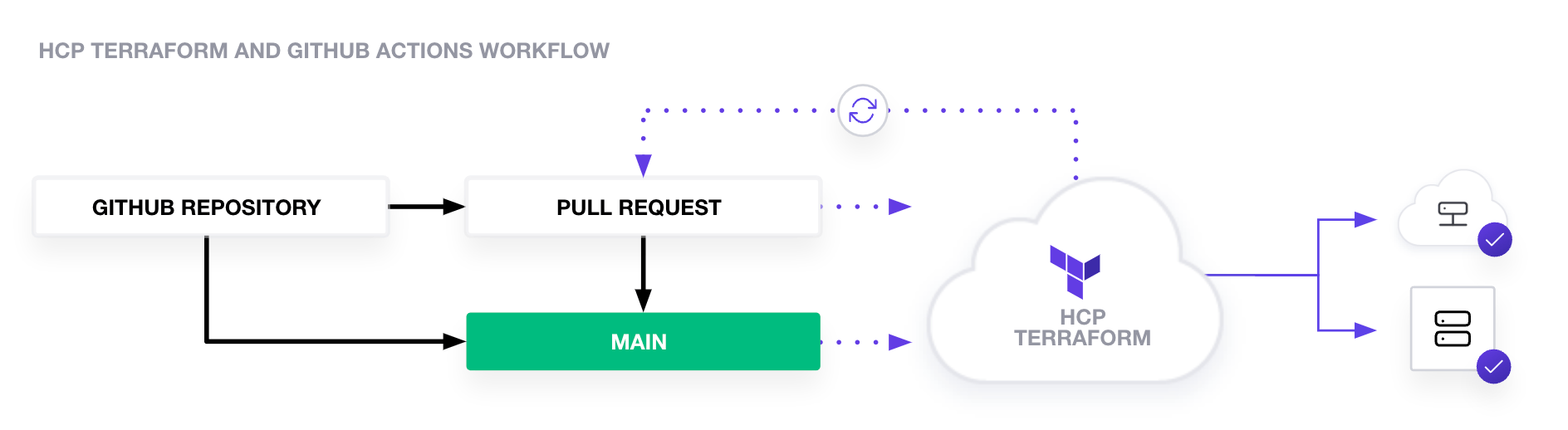

This is how my GitHub Action code would look like: (totally copied from the doc)
name: <NAME>

on:
  push:
    branches:
    - main
    paths:
    - 'terraform/<workspace_directory>/**'
  pull_request:
    types:
      - reopened
      - opened
      - synchronize
      - edited
    branches:
    - main
    paths:
    - 'terraform/<workspace_directory>/**'

jobs:
  terraform:
    name: 'Terraform'
    runs-on: ubuntu-latest
    permissions:
      pull-requests: write

    steps:
      - name: Checkout
        uses: actions/checkout@v3

      - name: Setup Terraform
        uses: hashicorp/setup-terraform@v2
        with:
          cli_config_credentials_token: ${{ secrets.TF_API_TOKEN }}

      - name: Terraform Init
        id: init
        run: terraform init

      - name: Terraform Format
        id: fmt
        run: terraform fmt -check

      - name: Terraform Validate
        id: validate
        run: terraform validate -no-color

      - name: Terraform Plan
        id: plan
        if: github.event_name == 'pull_request'
        run: terraform plan -no-color -input=false
        continue-on-error: true

      - name: Update Pull Request
        uses: actions/github-script@v6
        if: github.event_name == 'pull_request'
        env:
          PLAN: "${{ steps.plan.outputs.stdout }}"
        with:
          github-token: ${{ secrets.GITHUB_TOKEN }}
          script: |
            const output = `#### Terraform Format and Style 🖌\`${{ steps.fmt.outcome }}\`
            #### Terraform Initialization ⚙️\`${{ steps.init.outcome }}\`
            #### Terraform Plan 📖\`${{ steps.plan.outcome }}\`
            #### Terraform Validation 🤖\`${{ steps.validate.outcome }}\`

            <details><summary>Show Plan</summary>

            \`\`\`terraform\n
            ${process.env.PLAN}
            \`\`\`

            </details>

            *Pushed by: @${{ github.actor }}, Action: \`${{ github.event_name }}\`*`;

            github.rest.issues.createComment({
              issue_number: context.issue.number,
              owner: context.repo.owner,
              repo: context.repo.repo,
              body: output
            })

      - name: Terraform Plan Status
        if: steps.plan.outcome == 'failure'
        run: exit 1

      - name: Terraform Apply
        if: github.ref == 'refs/heads/main' && github.event_name == 'push'
        run: terraform apply -auto-approve -input=false
But what if I want to do a local plan without constantly committing my changes to git repository? I can use the terraform tool on command line to perform a plan.
I would need to log in to Terraform Cloud, first.
terraform login
This generate an API token and stores it locally in
konri@macmini-m2 site-homelab % cat ~/.terraform.d/credentials.tfrc.json
{
  "credentials": {
    "app.terraform.io": {
      "token": "<REDACTED>"
    }
  }
}
I would also need the following in all of my workspace directories.
terraform {
  cloud {
    organization = "<terraform_organization>"
    workspaces {
      name = "<workspace_name>"
    }
  }
}
I don’t really need to create workspace manually first. As long as the organization name is correct, Terraform Cloud will create the workspace if it doesn’t exist.
This would allow me to perform a plan by sending all the Terraform files in that workspace to Terraform Cloud. That plan state cannot be applied. I need to commit my code in order to apply the plan.
Conclusion #
Currently, without any servers, this is the best course of action to start automating my homelab.
This will also allow me to learn GitHub Actions (I use Atlassian Bitbucket at work) and experience the benefits of Terraform Cloud service; hitting two bird with one stone.
Questions #
- How am I going to deal with secrets?
It would be nice to have a centralized location to store secrets, like Hashicorp Vault (too bad Hasicorp doesn’t have a free hosted service like that). Should I store it in Github’s repository secrets page? Please don’t get hacked, GitHub!
Do I want to store my secrets in Terraform Cloud as sensitive variables? I forsee myself using a lot secrets in the future, and having that stored in Terraform workspaces is probably not best practices. I’ll probably have another application that needs access to sensitive data and having that application pull from Terraform Cloud just for secrets is not a good idea. I’ll need to look for another free solution to centralize storing my sensitive data.
- How should I manage my GitHub repositories and Terraform workspaces?
The chicken and egg problem, I think? There is a Terraform GitHub provider to manage Github repositories. Is it a good idea to have Terraform mange my Github repositories? Any updates to the Github repository resource will recreate my repositories, literally destory all the git histories and contents. Since it is a homelab and I strive for automation, why not?
How much automation is too much automation?